If you are building web applications with Node.js and Express, you will definitely comes into a term middleware. It is one of the foundational building blocks of Express, yet it can feel a bit confusing when you first encounter it.
You can understand it as a watchman or guard who asks for your identity before you enter a building or hotel
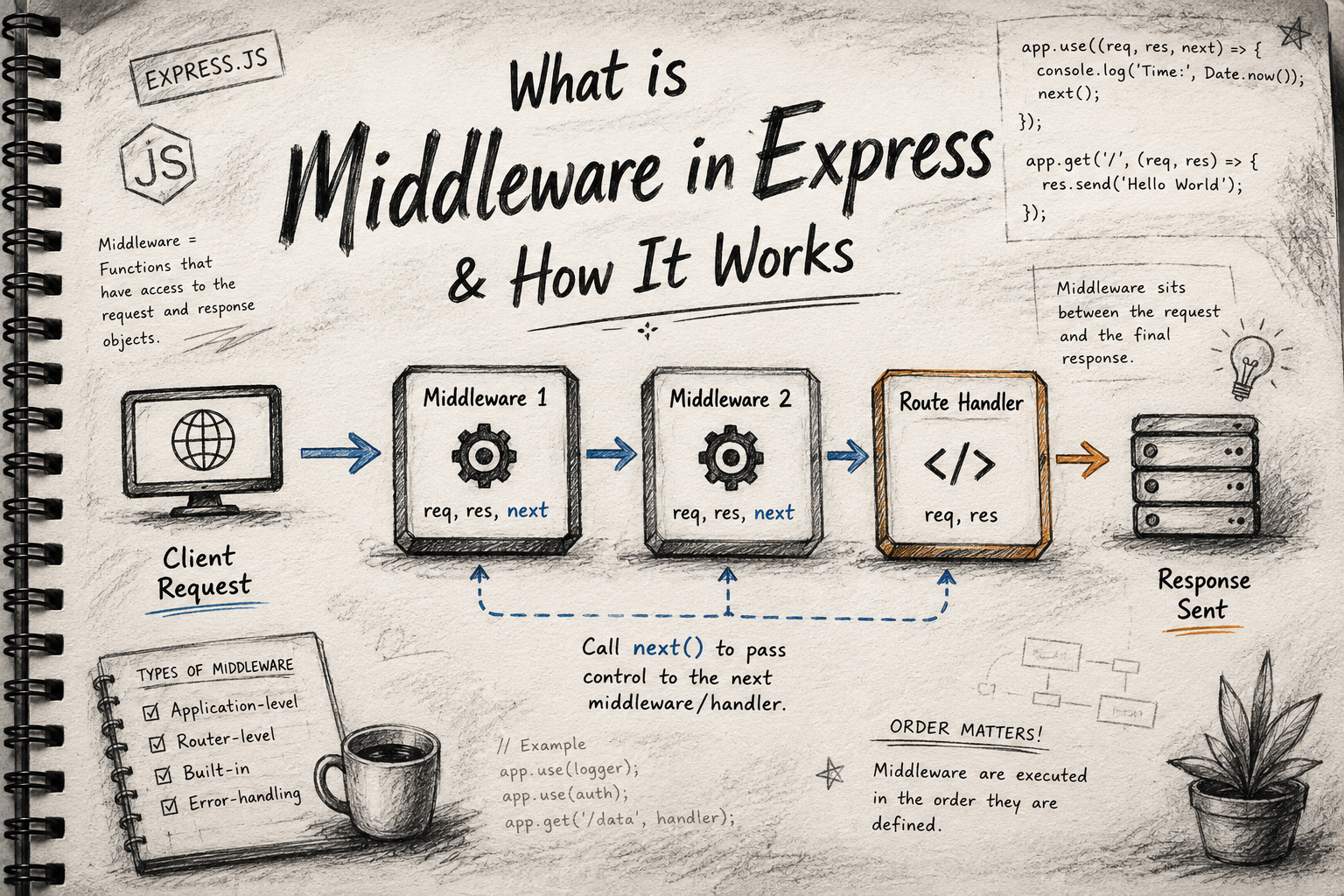
Think of Express middleware as a series of checkpoints or a request pipeline. Every time a client sends a request to your server, it doesn't just magically land on your final route handler. Instead, it travels through a pipeline of functions that can inspect, modify, or halt the request entirely before a response is sent back.
You will get a more clear idea of it, once you see the code and understands the logic behind it.
Where Middleware Sits in the Request Lifecycle
In a standard client-server communication, a client sends a Request (req), and the server returns a Response (res).
Middleware sits squarely in the middle of this lifecycle.
[Client Request] ---> [ Middleware 1 ] ---> [ Middleware 2 ] ---> [ Route Handler ] ---> [Client Response]
When a request comes in, Express passes it to the first middleware function. That function can do its job and then hand the request off to the next middleware, and so on, until it finally reaches your endpoint route handler (like app.get or app.post) which terminates the cycle by sending a response.
There can be a number of middlewares in between this lifecycle depending on how many checks you need to get done.
Types of Middleware
Express organizes middleware into a few main categories based on how and where they are applied:
1. Application-Level Middleware
These are bound directly to an instance of the app object using app.use() or HTTP method functions like app.get() and app.post(). It runs for every incoming request or specific routes across the entire app.
Example: Logging user requests.
const express = require('express');
const app = express();

// Application-level: Runs for every request
app.use((req, res, next) => {
  console.log(`Request received at: ${Date.now()}`);
  next();
});
Now, you must think what next is ? Don't worry, we will come to that too...
2. Router-Level Middleware
Router-level middleware works identically to application-level middleware, except it is bound to an instance of express.Router(). This is incredibly useful for separating your app into modular sections (like /api/v1/users vs /api/v1/products).
Example: Restricting access to an admin dashboard panel.
const router = express.Router();

// Router-level: Only runs for paths handled by this specific router
router.use((req, res, next) => {
  console.log('Router-specific checkpoint');
  next();
});
3. Built-in Middleware
Express comes with a few native middleware functions out of the box so you don't have to write basic parsing logic yourself:
express.json()parses incoming requests with JSON payloads (data).express.urlencoded()parses incoming requests with URL-encoded payloads.express.static()serves static assets such as images, CSS files, and JavaScript files.
Execution Order of Middleware
Express executes middleware in the exact top-to-bottom order in which they are defined in your code.
If you place a global logging middleware at the very top of your script, it will run for every single incoming request. However, if you place a middleware after a route handler, it will never execute for that route because the route handler will have already completed the request-response cycle.
The Role of the next() Function
An Express middleware function is structurally identical to a normal route handler, except it accepts a third argument: next.
app.use((req, res, next) => {
  // Do some work here...
  next(); // Pass control to the next middleware function
});
The next() function is the engine that keeps the request pipeline moving.
If you call
next(), Express immediately passes control to the next middleware in line.If you forget to call
next(), your request will hang indefinitely because Express doesn't know where to go next.If you send a response back to the client directly (e.g.,
res.send()orres.json()), you break the chain, and the lifecycle ends right there.
Real-World Examples
Let’s look at how middleware solves three common backend engineering challenges.
1. Logging Middleware
Track incoming traffic to see what endpoints are being hit.
app.use((req, res, next) => {
  console.log(`${req.method} request made to: ${req.url}`);
  next();
});
2. Authentication Middleware
Protect sensitive routes by checking if a user has a valid authorization token. If they don't, we stop the pipeline right here and return a 401 Unauthorized status.
const checkAuth = (req, res, next) => {
  const apiKey = req.headers['x-api-key'];

  if (apiKey === 'secret-token-123') {
    next(); // Valid key! Move to the route handler.
  } else {
    res.status(401).json({ error: 'Unauthorized: Invalid API Key' }); // Breaks the chain
  }
};

// Apply to a specific protected route
app.get('/dashboard', checkAuth, (req, res) => {
  res.send('Welcome to the premium dashboard!');
});
3. Request Validation Middleware
Ensure the incoming data format is correct before processing it in your database.
const validateUserPayload = (req, res, next) => {
  const { email, password } = req.body;

  if (!email || !password) {
    return res.status(400).json({ error: 'Email and password are required' });
  }

  next();
};

app.post('/register', validateUserPayload, (req, res) => {
  res.send('User registration validated and successful!');
});
Conclusion
Express middleware gives you a powerful, modular way to manage data flows within your application. By treating your server backend like a clean pipeline, you can seamlessly plug in security checks, parsing rules, and logging infrastructure without cluttering your core business logic!