URL Parameters vs Query Strings in Express.js
Introduction
When building web applications or REST APIs with Express.js, you frequently need to pass data from the client (browser or mobile app) to the server via the URL.
Two of the most common ways to achieve this are URL Parameters (Path Parameters) and Query Strings (Query Parameters). While they might look similar at a glance, they serve completely different purposes and are handled differently in Express.js.
In this guide, we will break down what they are, how to use them with practical code examples, and exactly when to use which.
What are URL Parameters?
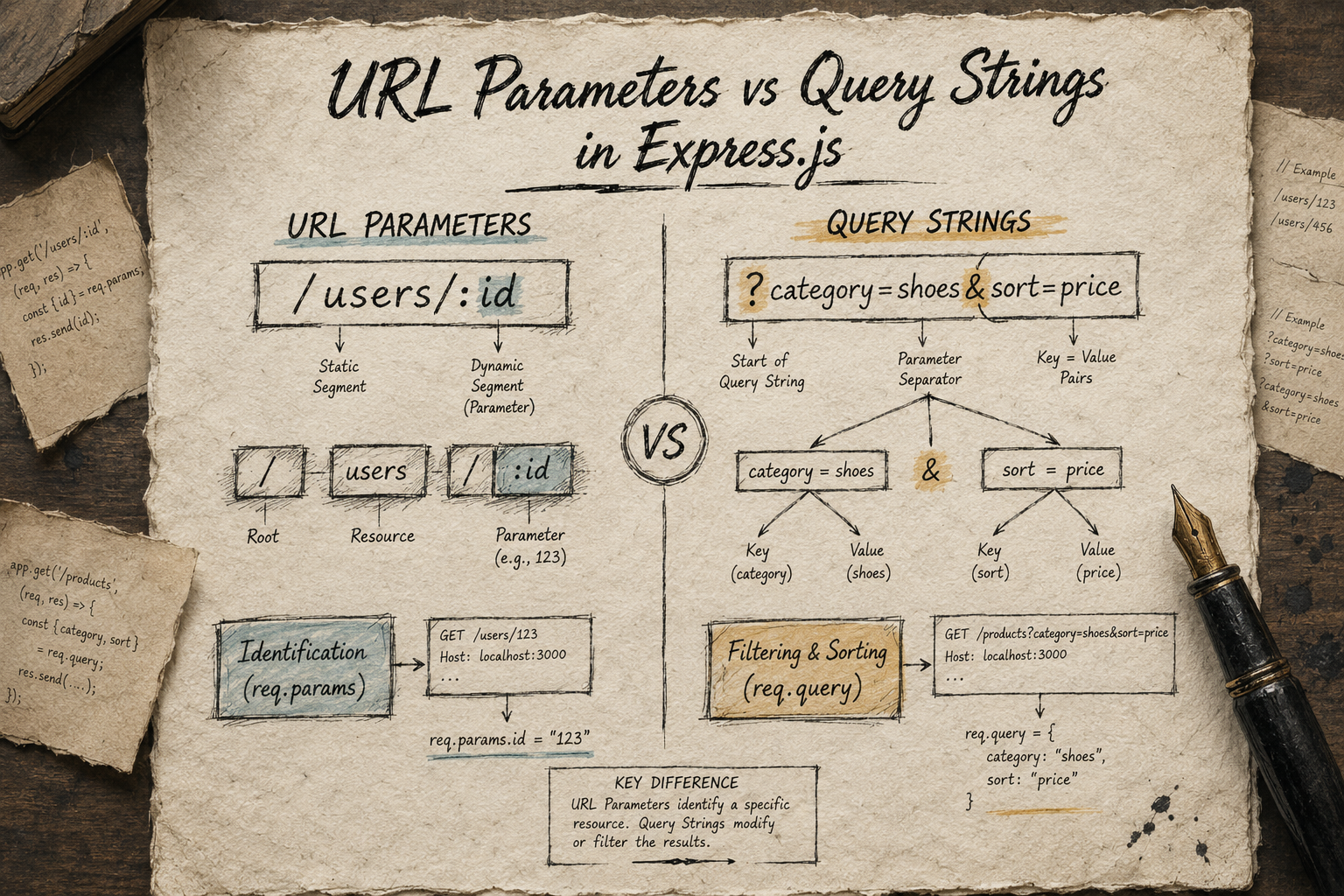
URL Parameters (also known as path parameters or route parameters) are dynamic segments of a URL path. They are baked directly into the URL structure and are used to point to a specific, unique resource.
Think of URL parameters as identifiers. They are part of the resource's destination address.
https://api.example.com/users/42
In this URL, 42 is a URL parameter representing a specific user's unique ID.
What are Query Strings?
A Query String is a set of key-value pairs appended to the end of a URL, starting right after a question mark (?). Multiple pairs are separated by an ampersand (&).
Think of query strings as filters, modifiers, or options applied to a collection of resources. They do not define the resource itself; rather, they alter how the data is returned or sorted.
https://api.example.com/products?category=shoes&sort=price_asc
In this URL, category=shoes and sort=price_asc are query parameters instructing the server to filter products by shoes and sort them by price.
Accessing URL Parameters
In Express.js, you define a URL parameter in your route path by prefixing a segment name with a colon (:). Express automatically parses this and makes it available inside the req.params object.
const express = require('express');
const app = express();

// Defining a route with a parameter named 'userId'
app.get('/users/:userId', (req, res) => {
    // Accessing the parameter
    const id = req.params.userId;

    res.send(`Fetching profile details for User ID: ${id}`);
});

app.listen(3000, () => console.log('Server running on port 3000'));
If a user visits /users/892, req.params.userId will be "892".
Accessing Query Strings
Unlike URL parameters, you don't need to define query strings in your Express route definitions. Express automatically extracts any query strings from the incoming URL and populates them into the req.query object as key-value pairs.
// Defining a standard route for an entire collection
app.get('/search', (req, res) => {
    // Accessing query strings
    const { term, page } = req.query;

    res.json({
        message: `You searched for "${term}"`,
        page: page || 1 // defaulting to page 1 if not provided
    });
});
If a user visits /search?term=javascript&page=2, req.query will be parsed as:
{
  "term": "javascript",
  "page": "2"
}
When to Use Params vs. Query?
Choosing between the two comes down to understanding the hierarchy of your data layout.
Use URL Parameters (req.params) when:
You are targeting a specific resource by its unique identifier (ID, username, slug).
The data is essential to identify what resource you are interacting with.
Good examples:
Fetching a user profile:
/users/:usernameDeleting a specific blog post:
/posts/:postId
Use Query Strings (req.query) when:
You are dealing with a list or collection and want to filter, sort, or paginate the results.
The data is optional and shouldn't change the foundational layout of the URL.
Good examples:
Searching through articles:
/articles?search=nodejsPaginating items:
/products?limit=10&offset=20Filtering options:
/flights?class=business&nonstop=true
Conclusion
Mastering the difference between req.params and req.query keeps your Express routing clean, logical, and compliant with REST API best practices. Use URL parameters to pinpoint your specific resource, and use query strings to filter or alter how that resource is delivered!